In general, to use textures in Three.js you will use objects that already have UV coordinates (such as planes, cubes etc) or objects created in external programs (such as blender). But sometimes you may have to apply textures to a custom object and in this case, you will have to create the UV coordinates manually.
In summary, UV mapping is the process of assigning 2D points in the texture to 3D points in the geometry. You will find an interesting explanation about that process in this tutorial. Open in a new tab
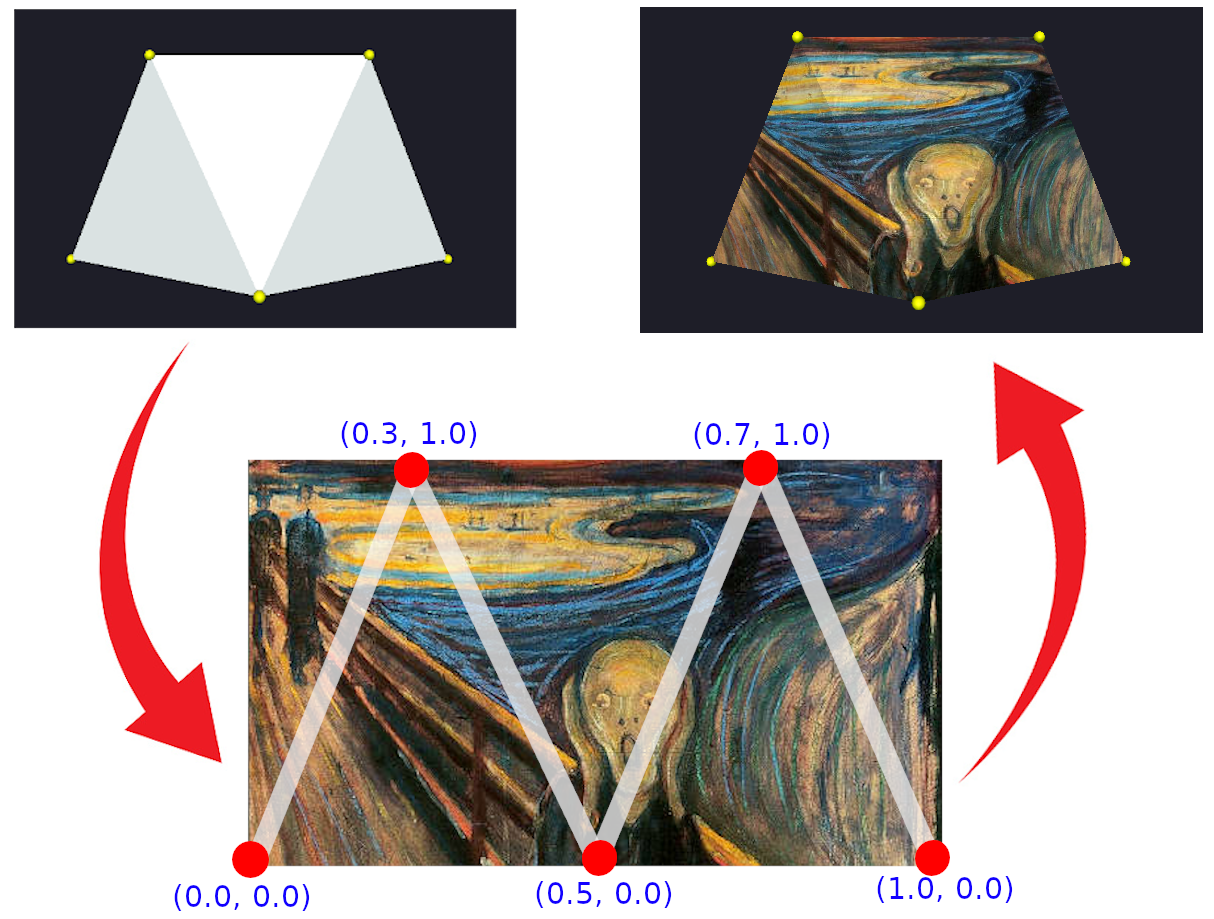
In Figure 1 you can observe how UV coordinates were applied in our example and the following code shows how to add these coordinates.
		function setTexture(mesh) {
			let geometry = mesh.geometry;
			let material = mesh.material;

			// You must set an individual UV coordinate for each vertex of your scene
			var uvCoords = [0.0, 0.0,
							0.3, 1.0,
							0.5, 0.0,
							0.7, 1.0,
							1.0, 0.0];

			geometry.setAttribute( 'uv', new THREE.BufferAttribute( new Float32Array( uvCoords), 2 ) );

			// Load the texture and set to the material of the mesh
			let texture = new THREE.TextureLoader().load('../assets/textures/art.jpg');
			material.map =  texture;
		}